Phonton Desktop
The same verified loop as the CLI, in a window: install and calibrate a local model, give it a goal, and review the candidates your tests let through. Inference stays on 127.0.0.1.
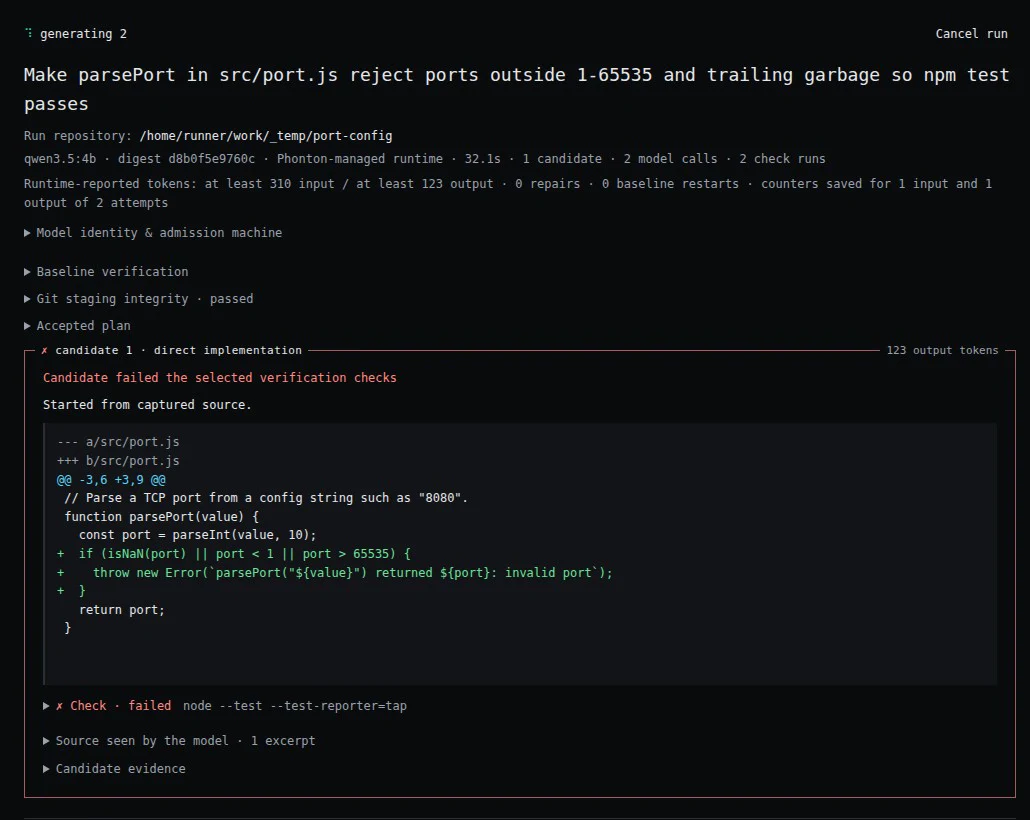
real run · Phonton Desktop 0.5.2 · engine 0.25.1 · qwen3.5:4b
1
Open a repository
Describe the change. Phonton proposes the files and the checks it will run.
2
Review the plan
Files, exact check commands, model and budget, before any model call.
3
Watch the attempts
Each candidate runs your tests on a copy. Failures go back to the model with the failing test.
4
Apply or walk away
Apply the verified diff with backups, or restore the original bytes later.
Download
The Windows build includes the Phonton engine. On macOS and Linux, install the CLI first with npm install -g phonton-cli; Desktop uses it.
Downloads for Windows, macOS, and Linux are on GitHub Releases.